Showing posts with label ax. Show all posts

Monday, March 11, 2024

D365 - Filter RefRecId Grid column for NULL Value

A client wanted to filter a column for blank values, and it wasn't working.  I tried all sort of query syntax tricks with no avail.  Is Exactly "", Is Not ?*, Is Exactly 0, Does Not Contain *, etc... The issue was that the field was a refRecId with a lookup against a related table. Here is what worked:

Use the 'Matches' option with the following value: (InventTable.FieldNameRefRecId == 0)

Include the parenthesis and change the field name to the field you are filtering on.

Thursday, July 18, 2019

Making a Dialog Form Stay on Top

I am working on a project that requires me to lock a parent form when a dialog is executed from a 'submit' button click on the parent form.  If the parent form is not locked, the user could continually push the button and execute multiple dialog boxes, which would not be good.  While exploring the Dialog class I found an easy solution, the IsModal variable. Simply set the isModal variable using the parmIsModal() method before calling Dialog.Run().  Like this.


Now, the user must close the Dialog before they can use any other AX form. Perfect!

Friday, June 7, 2019

SFTP File Upload via x++

I recently had a requirement to create a batch job that would upload a file to an SFTP server daily.  AX 2012 was not capable of doing this directly from X++.  I chose to create a C# class that references a ssh.net dll and then call that class from x++. Here is how I did it.

1. Create a new C# Class Library project in Visual Studio. I named mine 'CompanyToolbox' so I could add other helper classes to it in the future.
2. Add Project to AOT
3. Install the SSH.Net NuGet Package

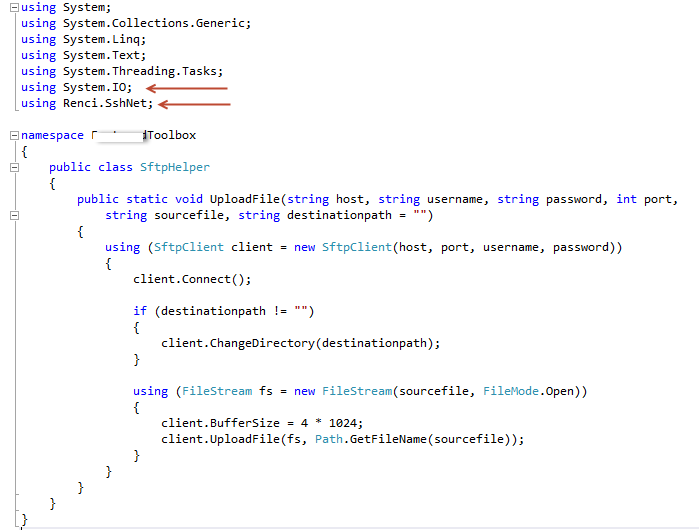
4. Create the 'SFTPHelper' class, and the UploadFile method. 

5. Set the Deploy to Client and Deploy to Server Properties of the project.

6. Add Project to AOT & Deploy
7. Once you Deploy, you should see the 'CompanyToolbox' DLL in the Server and Client Bin folders.

8. Unfortunately, I could not get the referenced renci.sshnet.dll to be automatically deployed to the client and server bins, so I had to manually drop them in.  You can copy the Renci.sshnet.dll from this location -      'C:\Users\(yourUsername)\AppData\Local\Temp\2\Microsoft Dynamics AX\C Sharp Projects\CompanyToolbox\bin\Debug'.  Paste the dll into the both the client and server bin folders. 

9. Restart the AOS if hot swapping is not enabled.
10. Call the method from x++.   


      Done!